CV
Military Documents You Can Use to Build Your CV/Resume or AQDs
I did my Transition Assistance Program (TAP) in Guam. During TAP I was asked to download 3 documents that had lists of my military experiences and training. These might be useful if you have not updated your CV/resume in a while (or ever) and needed to run a list of things you’ve done while on active-duty. They might also be useful if you are running the list of Additional Qualification Designators (AQDs). Here are those 3 documents:
The Verification of Military Experience and Training (VMET)
The VMET is a document I was unfamiliar with. It translates military experiences you’ve had into civilian equivalents. It is probably not that useful to most of us unless you did not keep your CV/resume up-to-date and need to use the VMET to build your CV. Here is what mine looked like when I downloaded it:
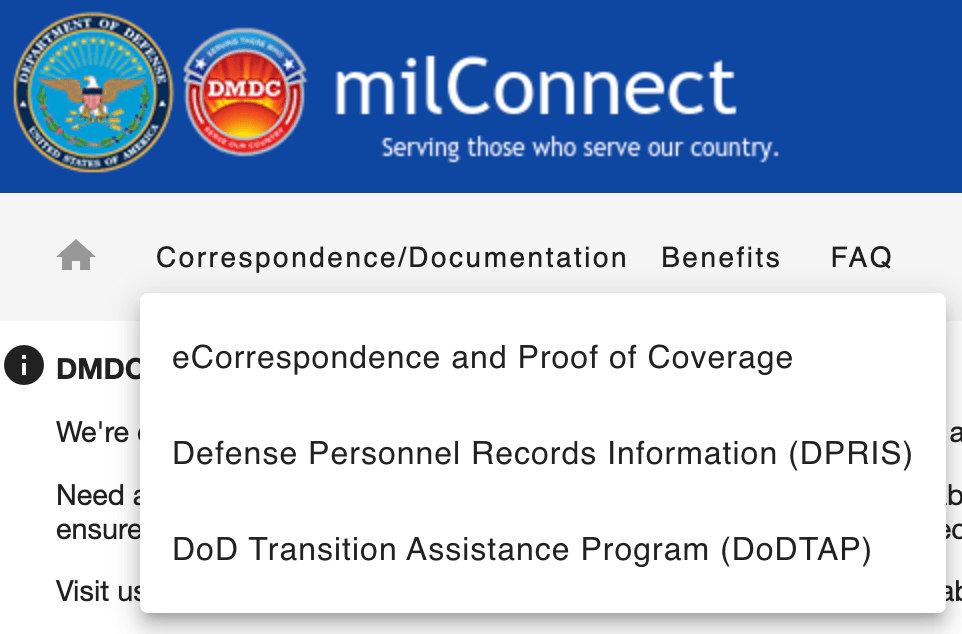
You obtain your VMET on milConnect by clicking on “Correspondence/Documentation” and DoD Transition Assistance Program:
You then click on the far right “VMET” tab:

The Joint Services Transcript (JST)
Another document that you can use to build our your CV/resume is the Joint Services Transcript. It can be obtained here. This is what it looks like:
Electronic Training Jacket
The 3rd document is your Electronic Training Jacket (ETJ). You can get it here.
I can’t post my ETJ because it is labeled FOUO and contains privacy data, but it included the following sections:
- Administrative Data
- NOBC Data – Navy Officer Billet Codes (NOBCs) for billets I occupied and how long I was in them.
- Education Data – Service schools plus any college degrees/courses you have.
- Language Skills – I have none!
- AQD Data – A list of all of my AQDs and subspecialty codes.
- Qualification/Certification Data – I didn’t have anything here.
- Awards Data – A list of all my military awards.
- Training Data – A list of all of my on-line training (373 in total, which is depressing).
- Career History – A list of all of my UICs I’ve belonged to with the arrival and detach dates.
Critical Retirement Step – Adapting Your CV to a Résumé
Throughout my career, I updated my academic curriculum vitae (CV) monthly. As a result, I thought it would be in good shape for transition, but I was wrong. Almost no one wanted to see my 40 page CV, and I needed a résumé.
My CV
Here is the CV I currently have and what I started with before getting all sorts of help condensing it down to a 2 page résumé:
During my job exploration so far, there were only two entities that were OK with my full CV, academic institutions and the VA. Other than that, every one else wanted a résumé that was only a few pages long.
Creating My Résumé
Initially, I just condensed my 40 page CV down to 2 pages, but that was not a polished résumé and I needed help. Similar to my LinkedIn profile update, many resources exist to help you create your résumé.
VetJobs
VetJobs gave me some detailed résumé and LinkedIn profile feedback, which you can read here:
They also partner with Hiring Our Heroes for an online résumé engine that I thought was cool.
Finally, they gave me a clean Applicant Tracking System (ATS) compliant résumé template that I liked and used:
ATS is the computer system that employers use to receive, organize, and screen résumés. If you have an overly complicated résumé format with photos, graphics, and other unnecessary things, it may impair the ATS screening of your résumé. It seems that when it comes to résumé format, simpler is better.
VetJobs regularly offers free virtual résumé sessions, which can be seen here.
Military Officers Association of America (MOAA)
I’ve spoken about MOAA before as I’m a lifetime member. They provided me free résumé feedback as well. To quote them, “Please don’t be concerned by all the comments—that is pretty standard for an initial draft.” Here was their feedback on my 2 page condensed CV:
Any MOAA members can send their résumés to transition@moaa.org. If you’re not a member, here is the membership link (basic membership is free):
COMMIT Foundation and Mr. Scott Vedder
The COMMIT Foundation helps transitioning veterans and they were able to get me a free hour with a resume/hiring coach who has literally written the book on resumes, Mr. Scott Vedder.
I talked to him for an hour and learned:
- Remove military jargon and titles. If I say I’m a “Captain”, civilians will think I drive a ship or fly a plane. Military titles are no longer my brand. I am a Veteran now, not a Navy Captain.
- Make sure everything on the résumé is true. For example, I shouldn’t say I’m the “CEO of US Naval Hospital Guam” because I’m not. Maybe I say I’m the “Senior Executive Leader” instead of “MTF Director” or “Commanding Officer”, both of which are military titles civilians won’t understand.
- All bulleted accomplishments should be unique to me. I shouldn’t have generic descriptions of my roles, but specific accomplishments that are mine. In other words, everything I list as an achievement during my time as XO of Portsmouth or CO of Guam should be unique to me. It should not be something my predecessors or successors could say too.
Here are a few links and tools that he said I could share:
- My web site is www.ScottVedder.com and I’ve got a trove of resources on it including:
- A PDF of My Top 5 Veteran Résumé Tips
- Another PDF with My Top 5 Veteran Interview Tips
- A page of veteran resources others have found helpful
- On LinkedIn I’ve got a few articles including:
- My “Smart 5th Grader Test” to ensure examples will always be understood by civilians or anyone in a different field
- Some great tips on networking including the approach we discussed to reach out to those with common backgrounds
- My books specifically for veterans, reservists, and MilSpouses include:
- Signs of a Great Résumé: Veterans Edition, and
- Signs of a Great Interview: Veterans Edition
- Side note: If you apply for federal agencies, be sure to follow the new USAJOBS résumé guidelines (including the 2-page limit) in compliance with the Merit Hiring Plan. I found this article from American Public University pretty insightful too and I agree with most of its points.
My Updated Résumé
While still a work in progress, if you want to see what my resume looks like after all of this, here it is:
Continuous MC Symposium – CVs with Dr. Servey – 21 JUN at 1200 EST
The next Continuous Medical Corps Symposium is on Wed. 21 Jun from 1200-1300 EST.
– Dr. Jessica Servey from USU will give a seminar on CVs.
– Please have a copy of your CV ready so that you can make the most of this session.
Microsoft Teams meeting
Join on your computer, mobile app or room device
Click here to join the meeting
Or call in (audio only)
+1 410-874-6747,,48244919# United States, Odenton
Phone Conference ID: 482 449 19
Continuous Medical Corps Symposium: Wednesday, 21 June 1200-1300 EST
The next Continuous Medical Corps Symposium will be on CVs with Dr. Servey from USU. CVs are used for almost all competitive positions and a well written CV shows the selection committee your accomplishments clearly and efficiently. To make the most of this session, please have a copy of your CV ready so that you can make the most of this session.
The session will be recorded and added to the Sharepoint site (once it is completed).
________________________________________________________________________________
Microsoft Teams meeting
Join on your computer, mobile app or room device
Click here to join the meeting
Or call in (audio only)
+1 410-874-6747,,48244919# United States, Odenton
Phone Conference ID: 482 449 19#
Find a local number | Reset PIN
If this conference supports dial-in (e.g., shows a commercial number and conference ID), the following DSN numbers may also be used: East DSN 322-874-6747 | West DSN 322-874-6757
________________________________________________________________________________
Throwback Thursday Classic Post – CV, Military Bio, and Letter of Intent Templates
Every nominative position requires you to submit a CV, military bio, and letter of intent (LOI), so I always have these documents ready. People are always e-mailing me and asking for templates, so here are some Word documents you can use as you see fit. I’ll also put them in the Useful Documents page.
For CVs there are many, many acceptable formats. Here is my personal CV:
Here is my military bio:
CAPT Schofer Military Bio – 5 MAY 2020
Here is an old LOI I’ve used:
Here is a LOI template created by CDR Melissa Austin when she was an EA:
Here are the BUMED templates if you want a slightly different flavor:
CV, Military Bio, and Letter of Intent Templates
Every nominative position requires you to submit a CV, military bio, and letter of intent (LOI), so I always have these documents ready. People are always e-mailing me and asking for templates, so here are some Word documents you can use as you see fit. I’ll also put them in the Useful Documents page.
For CVs there are many, many acceptable formats. Here is my personal CV:
Here is my military bio:
CAPT Schofer Military Bio – 5 MAY 2020
Here is an old LOI I’ve used:
Here is a LOI template created by CDR Melissa Austin when she was an EA:
Here are the BUMED templates if you want a slightly different flavor:
 Joel Schofer's Career Planning Blog