Retirement
Guest Post – How to Collect Important Documents When You’re Separating/Retiring
By CAPT(r) Nathan Almond, MC, USN
For personnel separating or retiring that wish to obtain documents from their service, below are some recommendations.
1. Get a copy of your Official Military Personnel File.
To get a copy of your military files such as fitness reports, SGLI elections, and other files from your career (besides your orders) go to BOL
https://www.bol.navy.mil/
Login with CAC
Click on ‘Official Military Personnel File (OMPF) – My Record’
Click on the ‘yes’ button
Click ‘download OMPF’ button
Wait for ‘save as’ folder to pop up as the zip file is downloaded and save as a zip file
That’s it! Now you have your OMPF files.
2. To get copies of all of your orders (besides IA ones), in NSIPS click ‘Employee Self Service’, then ‘Electronic Service Record’, then ‘view’, then ‘orders history’. You can then click on ‘select all’ and then ‘Print Selected Orders and Transfer Information Sheets’ to get a pdf of all your orders written in your career.
3. If you deployed IA, get a copy of your IA orders for future reference. In BOL click on
Navy-Marine Corps Mobilization Processing System (NMCMPS) – View IA/ADSW orders
Click the ‘show orders’ button, then click on the orders you want. You may have to click on the ‘popup blocker’ in the address bar and then again on the link that was blocked in order to get the file, depending on your computer settings, but you don’t have to change the settings, just click on the ‘popup blocker’ in the address bar in Chrome and then the website that comes up and your file will download.
4. Also I found helpful to get a history of my career assignments. In NSIPS click on ‘view professional history’, then ‘history of assignments’, then ‘print form’ to get a pdf list of your assignments. Again, you may have to click on the ‘popup blocker’ in the address bar in Chrome followed by the address that was trying to download the file, but you should be able to obtain the pdf list.
5. I think getting the current pdf of your ODC, OSR, PSR is also helpful but CAPT Schofer has already outlined how to do that in the Promo Prep document.
How retirement plans for dozens of Navy officers were upended by a new law
I you want to retire as an O4, you now have to stay in 3 years instead of 2:
No, a SECDEF Memo Did Not Change the Time-in-Grade Retirement Requirements
There has been a SECDEF memo flying around the interwebs that is being misinterpreted. People think it might let them retire at the 2-year mark as an O5 or O6, but there has been no change to current policy (which requires 3 years). Here is the response from PERS:
“Some of you have been fielding queries about the attached memo so wanted to address this for everyone. The memo does delegate authority to the Service Secretaries to reduce time in grade requirements. However, this delegation does not equate to Service policy. We are still awaiting on how the Navy will implement any changes in time in grade requirements.
So for now, please inform any folks inquiring about it that no formal Navy policy has been promulgated based on the new authority. And current policy stands.”
I did not attach the memo because this guy is not in the habit of posting SECDEF memos on a public blog.
Save Some for Your Future Self
Jonathan Clements was a longtime personal finance columnist for The Wall Street Journal, and he offers great advice at the best price you can get (free) on his blog Humble Dollar. Here is one piece of advice from his site:
“SAVE SOME FOR YOUR FUTURE SELF. Looking to lose weight? At restaurants, transfer half your serving to a second plate and ask the waiter to box it up. If the food will make good leftovers, it’s easy to do, because you know you’ll have a treat tomorrow. Want to save more? Think about it the same way—and set aside some of today’s spending money for tomorrow.”
If you are wondering how much to save for your future self, here are a few ways to figure that out.
To start, you have to figure out your gross (pre-tax) income. Include every dollar you get, even the non-taxable allowances. If you’re not sure exactly, take your best guess.
The Minimum
In my opinion, the absolute bare minimum you need to save for retirement is 10% of your gross income. You can include all of your employee contributions in this, like the DoD match in the Blended Retirement System. This doesn’t have to all be your money.
That said, 10% is the minimum. You’ll likely work into your 60s unless you stay in long enough to have a pension.
The Most Common Recommendation
Most commonly people recommend you save 12-15% of your gross income for retirement. If you read this article from Vanguard about how much to save, you’ll see:
If retirement is decades away, setting a specific goal amount is probably unnecessary. For now, focus on:
1. Immediately saving at least enough to get the full match offered by your employer plan, if you have one. This is free money—don’t let it pass you by.
2. Working your way up to 12%–15% of your pay, including any employer match. For example, you could increase your savings rate 1% every year until you reach your target rate. This should get you in the ballpark of what you’ll need.
The Early Retirement Recommendation
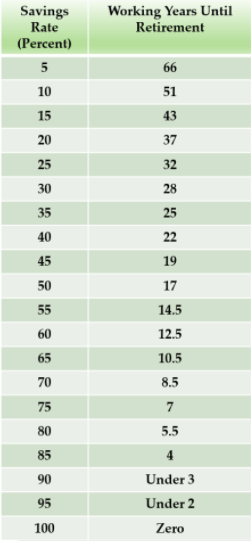
If you want to achieve financial independence or have the option of retiring early, you probably need to save more than 15%. Mr. Money Mustache’s amazing post about the shockingly simple match of early retirement has this table that shows you how long you’ll need to work based on your savings rate:
The Bottom Line
Start with your gross pay. You need to save a minimum of 10% of that, but you should try to save at least 15%. If you want to achieve financial independence and have the option to retire early or go to part-time work, you need to save more than 15%. I’d recommend 20% or more. I’ve done 30% my whole career.
If you want out help saving for retirement, start here where we discuss it in more depth.
 Joel Schofer's Career Planning Blog