Author: Joel Schofer, MD, MBA, CPE
Finance Friday Articles
- Are Millennials Doomed?
- Bond Allocation: Fixed Amount vs. Percentage
- Investing Blog Roundup: Estate Planning on the Bogleheads on Investing Podcast
- I’ve maxed out my 401(k). Now what?
- Loss Aversion: A Killer to Successful Investing, and How to Beat It
- Rethinking the Investing “Rules” Feds Are Told to Follow — Especially for Your TSP
- Some troops report mid-month pay issues after Pentagon shifts billions amid shutdown
- The Fidelity Youth Account — Should You Use It?
- What determines equity returns
- When Should You Sell a Stock?
- Why I Don’t Own Any Gold
I’m Retiring! Let’s Take This Journey Together
I’ve decided to retire on 1 JUN 2026 at the 25 year mark. This may surprise some people. It surprised me, but it is time to do something else.
As this process progresses over the next 9 months, I plan on documenting what I go through to help others who decide to do the same one day.
How to Request Retirement on NSIPS
This is the Google AI overview, which I found to be accurate and made minor edits to:
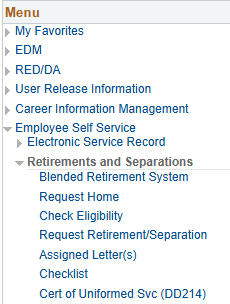
To request retirement on NSIPS, log in and navigate to Main Menu > Employee Self Service > Retirements and Separations > Retirement/Separation Request. Here is a screenshot I took to show you where to go:
Select the appropriate request type and fill out the details, including your desired retirement date. Keep in mind that you must retire on the 1st of the month. After entering your contact information, route the request to your Command Reviewer for processing and attach any required supporting documents.
Overall, I found the process surprisingly simple. I only had one issue I couldn’t figure out, and my Command Career Counselor showed me that I needed to add my “PSA” or “Planned Separation Address”:

Detailed Steps:
- Log In to NSIPS: Access the Navy Standard Integrated Personnel System (NSIPS) and log in to your self-service account.
- Navigate to Retirements and Separations: From the main menu, select Employee Self Service, then Retirements and Separations.
- Initiate Your Request: Select Retirement/Separation Request.
- Choose Request Type: From the dropdown menu, select the appropriate type of retirement or resignation.
- Enter Details: On the “Contact Information” tab, ensure both your current home address and your planned retirement address are accurate.
- Route Your Request: Click the “route” button at the bottom of the page to send your request for review by your command.
- Attach Documentation: After routing, you will proceed to an attachment screen to upload any necessary supporting documents, such as a copy of your DD Form 2648 (Pre-separation Counseling Checklist).
- Submit for Final Decision: Once all steps are complete, submit the request to Navy Personnel Command for a final decision.
Important Considerations:
- Timing: Officers should submit their voluntary retirement requests 9-12 months before their projected rotation date (PRD).
- Check Eligibility: You can check your eligibility for retirement within NSIPS by going to Employee Self Service > Retirements and Separations > Check Eligibility.
- Pre-Separation Counseling: A mandatory prerequisite to attending the Transition Assistance Program (TAP) is completing the Pre-separation Counseling Checklist (DD Form 2648), which must be signed by your Command Career Counselor.
- Contact Support: If your command lacks NSIPS capability, or you need assistance, contact Officer Retirements Branch (PERS-835) for guidance on submitting your request.
Also, here is a checklist I was given by my Career Planner that I plan on working through:
Medical Corps Chief Message – Updated Medical Corps Chief SharePoint
Good afternoon, all. I don’t send many group emails, but I wanted to share an exciting tool the Corps Chief’s office has created to improve our ability to serve and inform you about relevant topics that impact the Navy Medical Corps community. The team has enhanced our SharePoint homepage which is accessible on all CAC-enabled platforms at the following link:
https://esportal.med.navy.mil/bumed/m00/m00c/M00C1/Pages/Homepage.aspx
This new hub streamlines access to critical announcements, resources, and communication channels. It also provides an opportunity for you to schedule CDBs with the MC Corps Chief team and provide suggestions for improvements.
Specific updates that we believe will benefit you:
- Your Voice Matters: Use the Anonymous Suggestion Box to directly impact Corps improvements. Feedback will be reviewed by the Corps Chief Office, and responses will be shared with the community.
- Connect with Leadership: Easily schedule appointments and Senior Career Development Boards with CAPT Feldman and the Corps Chief team through our integrated booking system.
- See Our Impact: The “Medical Officers in Action” slideshow highlights the incredible work of Navy Medical Officers around the world. Submit nominations to share your colleagues’ stories.
- Advance Your Career: Stay informed about current openings and collateral opportunities on our regularly updated “Position Applications” and “Collateral Opportunities” pages.
- Stay Informed: Access complete materials from the recent Medical Corps Chief All Hands Call, including recordings, slides, and a comprehensive Q&A.
Please take a few minutes to visit the new site and explore the enhanced resources. I hope you find it useful and am looking forward to your feedback.
Thanks for all you do.
V/r,
Kevin
Current Medical Corps Position Applications
The following leadership positions are currently accepting applications. Please visit our updated SharePoint “Position Applications” page for complete details, qualifications, and application procedures:
- Pediatrics Residency Program Director at San Antonio Uniformed Services Health Education Consortium (SAUSHEC), Report Date April 2026 (Application Deadline 22 October 2025)
- Director, Force Medical Readiness (N10D), Report Date May/June 2026 (Application Deadline 03 November 2025)
 Joel Schofer's Career Planning Blog