Retirement
MOAA – How far out should I start planning my career transition when leaving service, and what are some good first steps?
This article says to start 12-18 months from your desired service date. I COMPLETELY agree. I decided at 9 months, and the only reason that is enough time for me is because I don’t need a job:
How to Confirm Credit for USU and HPSP Time Before Retirement from Active Duty
Does time at Uniformed Services University (USU) or annual training (AT) while on HPSP count toward retirement? Yes, but it is only added on once you hit 20+ years. You can’t use that time to get to 20.
How do you confirm you are getting credit for this time? Read below.
You need to check your retirement statement of service (SoS), which is usually available 90-120 days before retirement (mine was available at 124 days), and ensure time at USU or AT in HPSP is incorporated into the retirement computation. Officers should make sure their SoS is correct BEFORE they retire. This gives people only a short window to check their SoS and request any needed changes.
How to Get Your SoS
The SoS can be downloaded via NSIPS. Some instructions are listed on this site where it states:
What is a Statement of Service (SoS)? How do I view my retirement SoS?
Refer to Statement of Service. A retirement SoS is viewable via NSIPS. Log into Member Self-Service, select Employee Self-Service -> Retirements and Separations – > Check Eligibility -> Statement of Service -> Generate SoS Form (be patient at this point and select “Refresh” a few times over 30 seconds or so). A new link should appear with the word “view” in it. Select that link. A draft retirement SoS is normally available to review 90-120 days prior to retirement date.
Here is the section of my SoS where you can see the credit added with my HPSP AT time highlighted:
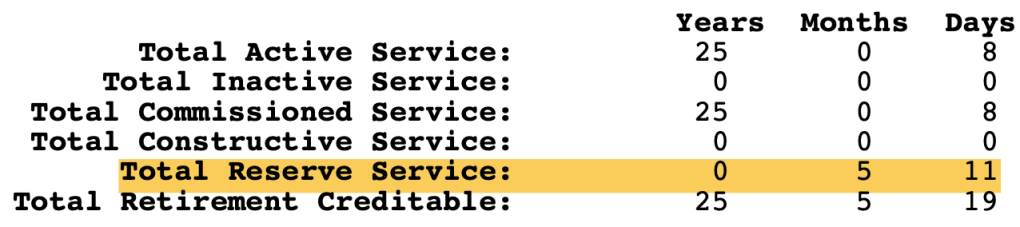
I will note that at the top of the SoS it says, “AFHPSP, Not Creditable For Any Purpose.” That can be a little scary, but the meaning of “not creditable for any purpose” is explained in this 2021 letter to me from the Senior Detailer at the time. He is discussing USU credit and not HPSP, but in the end they are treated the same:
They say it is “not creditable for any purpose” because it is not utilized to calculate active duty pay or eligibility toward retirement.
My Transaction Service Center also told me to refer back to my SoS, where I would find the retirement credit from HPSP, instead of my draft DD-214. This time does not appear on your DD-214.
The Bottom Line
When you are trying to confirm retirement credit for USU or HPSP, you need to check your SoS 90-120 days out from retirement by downloading it from NSIPS.
If anyone is interested, here is the original memo that explains how they credit USU time toward retirement:
Want a Free Portrait/Headshot for LinkedIn? Use Portraits for Patriots
I already wrote about my LinkedIn profile update, which required a new headshot/portrait. While I paid about $100 for mine, there is a charity that will do it for free. You can find their website here:
Critical Retirement Step – Adapting Your CV to a Résumé
Throughout my career, I updated my academic curriculum vitae (CV) monthly. As a result, I thought it would be in good shape for transition, but I was wrong. Almost no one wanted to see my 40 page CV, and I needed a résumé.
My CV
Here is the CV I currently have and what I started with before getting all sorts of help condensing it down to a 2 page résumé:
During my job exploration so far, there were only two entities that were OK with my full CV, academic institutions and the VA. Other than that, every one else wanted a résumé that was only a few pages long.
Creating My Résumé
Initially, I just condensed my 40 page CV down to 2 pages, but that was not a polished résumé and I needed help. Similar to my LinkedIn profile update, many resources exist to help you create your résumé.
VetJobs
VetJobs gave me some detailed résumé and LinkedIn profile feedback, which you can read here:
They also partner with Hiring Our Heroes for an online résumé engine that I thought was cool.
Finally, they gave me a clean Applicant Tracking System (ATS) compliant résumé template that I liked and used:
ATS is the computer system that employers use to receive, organize, and screen résumés. If you have an overly complicated résumé format with photos, graphics, and other unnecessary things, it may impair the ATS screening of your résumé. It seems that when it comes to résumé format, simpler is better.
VetJobs regularly offers free virtual résumé sessions, which can be seen here.
Military Officers Association of America (MOAA)
I’ve spoken about MOAA before as I’m a lifetime member. They provided me free résumé feedback as well. To quote them, “Please don’t be concerned by all the comments—that is pretty standard for an initial draft.” Here was their feedback on my 2 page condensed CV:
Any MOAA members can send their résumés to transition@moaa.org. If you’re not a member, here is the membership link (basic membership is free):
COMMIT Foundation and Mr. Scott Vedder
The COMMIT Foundation helps transitioning veterans and they were able to get me a free hour with a resume/hiring coach who has literally written the book on resumes, Mr. Scott Vedder.
I talked to him for an hour and learned:
- Remove military jargon and titles. If I say I’m a “Captain”, civilians will think I drive a ship or fly a plane. Military titles are no longer my brand. I am a Veteran now, not a Navy Captain.
- Make sure everything on the résumé is true. For example, I shouldn’t say I’m the “CEO of US Naval Hospital Guam” because I’m not. Maybe I say I’m the “Senior Executive Leader” instead of “MTF Director” or “Commanding Officer”, both of which are military titles civilians won’t understand.
- All bulleted accomplishments should be unique to me. I shouldn’t have generic descriptions of my roles, but specific accomplishments that are mine. In other words, everything I list as an achievement during my time as XO of Portsmouth or CO of Guam should be unique to me. It should not be something my predecessors or successors could say too.
Here are a few links and tools that he said I could share:
- My web site is www.ScottVedder.com and I’ve got a trove of resources on it including:
- A PDF of My Top 5 Veteran Résumé Tips
- Another PDF with My Top 5 Veteran Interview Tips
- A page of veteran resources others have found helpful
- On LinkedIn I’ve got a few articles including:
- My “Smart 5th Grader Test” to ensure examples will always be understood by civilians or anyone in a different field
- Some great tips on networking including the approach we discussed to reach out to those with common backgrounds
- My books specifically for veterans, reservists, and MilSpouses include:
- Signs of a Great Résumé: Veterans Edition, and
- Signs of a Great Interview: Veterans Edition
- Side note: If you apply for federal agencies, be sure to follow the new USAJOBS résumé guidelines (including the 2-page limit) in compliance with the Merit Hiring Plan. I found this article from American Public University pretty insightful too and I agree with most of its points.
My Updated Résumé
While still a work in progress, if you want to see what my resume looks like after all of this, here it is:
Critical Retirement Step – The LinkedIn Profile Update
If you are retiring or separating and you have any interest in a civilian position, you probably need to update your LinkedIn profile. My profile was reasonably up-to-date and accurate, but as you’ll see it didn’t incorporate many of the best practices of a professional profile. Here is a brief story of my LinkedIn profile update…
First, I got some feedback from the Military Officers Association of America (MOAA). I think MOAA is a great organization. They lobby for military and veterans, they keep you informed about what is going on (many of the articles on MCCareer.org are from MOAA), and they offer a lot of services you may need, like LinkedIn profile reviews! I value my MOAA membership so much that even though basic membership is free, I’m a lifetime member.
The MOAA professional that did my LinkedIn review is Pat L. Williams, PhD, PHR, Captain, U.S. Navy (Ret.), Program Director, Engagement and Career Transition Services. She was very thorough, as you are about to read. Here is a summary of her feedback.
The e-mail she sent me made these points:
- Keep your profile up-to-date.
- Make sure your background photo is appropriate. If you Google for LinkedIn background photos, you’ll find thousands you can use. She though my photo was fine as it advertised my blog (and was my may to make sure the DoW social media disclaimer is there).
- Maintain a relationship with your contacts by sharing and liking their posts on the site. It just takes 2-3 “touches” a year.
- Don’t be afraid to reach out to people. That is why they are on the site, to cultivate and maintain strong professional networks. Today 80-85% of people get their next job via networking!
- Participate in MOAA’s LinkedIn Career Networking Group, which has 47K professionals/participants.
But the money was in this document:
You really need to read the above document if you want the full flavor of the review. Some highlights include:

- You can get 1 year of LinkedIn Premium for free if you are military affiliated (active duty, reserves, veteran, spouse). Here is an article that discusses the value of LinkedIn Premium.
- I needed a new headshot, so I had some professional headshots done when I was home on leave for Thanksgiving. I tried the AI tools, but the free ones didn’t work well for me. I just paid $100 and got them done by a local photographer. Boom!
- My headline needed to be revised. “CEO of US Naval Hospital Guam” was what it used to say. This was my attempt to follow current DoW guidance and not used military titles like “Commanding Officer” or “MTF Director.” Instead, it now says, “Chief Executive Officer | Experienced Senior Healthcare Executive Specializing in Medical Education, Communication, and Leading with Humor | Educating Physicians to Develop Their Careers | Veteran”.
- My LinkedIn profile URL had a bunch of random letters and numbers after my name. It now is https://www.linkedin.com/in/joel-schofer/. This looks much more professional on a resume or CV.
- I already had a lot of connections and activity from blog posts I was posting on LinkedIn, so I was good there.
- I needed to rewrite my summary.
- I had 7 skills, but I now have the maximum of 100. These took me a whole weekend to add. Skills are what gets you to pop when recruiters search for people.
- I now belong to a few groups.
- I have liked all the companies I’m interested in working for and have job alerts set up for them.
Seriously, download the Word document above and give it a look. It was a thorough review.
There were other LinkedIn resources shared including a multiple webinars on LinkedIn branding on this page, but they all require you to be a premium MOAA member (not the basic free membership).
She also tipped me off to a former Army Sergeant Major and LinkedIn expert named Michael Quinn who offers “The Ultimate LinkedIn Cheat Sheet” and “How To Set Up an Effective LinkedIn Profile” on his LinkedIn profile. The are both good resources I’m working through.
If you are a MOAA member and want a resume (more to follow on that fun) or LinkedIn profile review, Pat said to e-mail transition@moaa.org. If you want to join, and remember that basic membership is free, you can read all about joining MOAA here:
 Joel Schofer's Career Planning Blog